
What EOSB is and why you should estimate it early
End of service benefits Saudi Arabia refers to the payment an employee may receive when employment ends, based on service length, wage basis, and the type of exit. In simple terms, it is one part of your final settlement, not the whole settlement.
For expats, estimating EOSB before resigning or accepting an exit decision is practical. It helps you compare what HR offers against your own records and spot missing items before you sign anything.
This matters even more if you are planning a move, transfer, or resignation timeline. A weak estimate can affect cash flow, notice planning, and your next step in the Kingdom. If you are still deciding on timing, review what to check before resigning in Saudi Arabia .
Eligibility, continuous service, and what can affect the outcome
Your estimate starts with one basic question: what counts as continuous service?
In practice, continuous service usually means the full period you remained employed under the same work relationship from start date to end date. That is why your contract, joining date, and official last working day matter so much.
Events that can affect eligibility or the final number include:
- Resignation versus termination
- Probation-related exits
- Unpaid leave periods
- Contract renewals
- Breaks in service or rehire after a gap
- Disputes over the official last day
- Salary changes during employment
The exit type matters because the rule path may change depending on whether you resigned or were terminated. Notice handling can also affect the dates used in the final settlement, so it helps to understand Saudi notice period rules .
If there was a gap between two periods of employment, do not assume they automatically merge into one service block. Ask HR to confirm in writing whether they are treating your history as continuous or separate.
EOSB inputs checklist before you calculate
Before doing any math, collect your inputs. Many wrong estimates happen because one key detail is missing or unclear.
The minimum data you need
- Employment start date
- Employment end date or expected last working day
- Contract type shown in your documents
- Wage basis used for EOSB
- Basic salary and allowance breakdown
- Salary history if your pay changed over time
- Unpaid leave periods, if any
- Exit type: resignation or termination
- Notice details
- Any written settlement draft from HR
Where to find each input
- Start date: offer letter, contract, onboarding letter, HR system
- End date: termination letter, resignation acceptance, final handover notice
- Contract type: signed contract and any renewal documents
- Wage breakdown: payslip, contract annex, HR salary certificate
- Salary history: older payslips, bank records, salary revision letters
- Unpaid leave: HR leave system, manager approvals, leave forms
- Exit type: official email, letter, or HR acknowledgment
- Notice details: contract clause, resignation email, acceptance message
- Settlement draft: HR settlement sheet or payroll statement
Mini-case: spot the missing salary base
A common problem is a contract that shows only a total monthly salary, with no split between basic salary and allowances. In that case, do not guess.
Ask HR for:
- A written wage breakdown
- The salary component used for EOSB calculation
- The latest approved payroll structure
- Any salary revision letters that changed the split
This is one of the common issues that also appears in wider Saudi labor law for expats .
EOSB calculation method: a clear step-by-step framework
Use the same sequence every time so you do not mix the variables.
Step 1: Calculate service duration
Count from the official start date to the official end date. Then identify any periods that may need adjustment, such as unpaid leave or disputed gaps.
Write the service period in years, months, and days. Do not round too early.
Step 2: Choose the correct rule path
Before doing any salary math, confirm the path:
- Resignation
- Termination
- Another exit category shown in writing
Do not rely on verbal wording. Use the document category HR is using for your exit.
Step 3: Confirm the salary base
Check what wage figure is being used. This is where many estimates go wrong. A settlement can look neat on paper but still use the wrong base.
Step 4: Compute the estimate
Apply the service duration to the salary base under the correct path. If your salary changed during employment, separate the periods clearly instead of blending numbers without logic.
Step 5: Adjust for edge issues
Then review:
- Partial year treatment
- Unpaid leave
- Missing salary periods
- Wrong end date
- Wrong exit category
- Deductions that reduce what you actually receive

What salary base is used for EOSB in practical terms
The phrase “salary base” sounds simple, but in practice it causes many disputes.
Your total monthly package may include:
- Basic salary
- Housing allowance
- Transport allowance
- Other fixed allowances
- Variable pay such as incentive, commission, or bonus
Do not assume every part is treated the same way in the final calculation. Instead, ask HR one direct question: What exact wage basis are you using for EOSB, and can you show it in writing?
Ask for a settlement sheet that clearly shows:
- Basic salary
- Fixed allowances
- Any excluded components
- Salary effective date
- Last payroll month used
- EOSB calculation base
If you are preparing for a move after exit, it also helps to understand how to change jobs legally in Saudi Arabia under the mobility system .
If you want help turning your work history into a stronger CV for your next application, we offer paid support to rewrite or optimize it for real job use .
EOSB example #1: simple 1–2 year case
Let’s use round numbers for a basic estimate.
Example inputs
- Start date: 1 January 2023
- End date: 31 December 2024
- Service: 2 full years
- Basic salary used for estimate: SAR 4,000
- Exit type: termination
- No unpaid leave
- No salary changes
Clean estimate method
- Confirm service = 2 full years
- Confirm termination path
- Use the agreed salary base = SAR 4,000
- Apply the EOSB rule used by HR for that service period
- Final result = your estimate, pending HR confirmation of the correct base
Why this example is useful
This simple case shows the right order: service first, exit type second, salary base third. Even in a clean case, your number is still an estimate until HR confirms the wage basis in writing.
EOSB example #2: 3–5 years with allowances
Now let’s make it more realistic.
Example inputs
- Service: 4 years
- Basic salary: SAR 5,000
- Housing allowance: SAR 2,000
- Transport allowance: SAR 800
- Exit type: termination
- No service gap
- One unpaid leave period under review
What changes here
The main issue is not the years. It is the salary structure.
If HR calculates using one wage figure and you estimate with another, your result can be far apart. That is why you should ask whether the calculation is based on:
- Basic salary only
- Basic plus fixed allowances
- Another payroll-defined figure
What to request from HR
Ask for:
- Payroll breakdown for the final active month
- Written confirmation of salary components used
- Record of unpaid leave and whether it affects service count
- Settlement worksheet with line-by-line values
EOSB example #3: 6–10 years with salary growth
Longer service often means salary changes. Handle that cleanly.
Example inputs
- Total service: 8 years
- Years 1–2 salary base: SAR 4,500
- Years 3–8 salary base: SAR 6,000
- Exit type: termination
- No break in service
Clean way to handle salary changes
Create a two-line service record:
- Period 1: first 2 years at the earlier salary base
- Period 2: next 6 years at the later salary base
Then compare that against HR’s method. If they use a single figure across the whole employment period, ask them to explain why.
This is the easiest way to avoid confusion when reviewing salary revisions, promotions, or contract renewals.

EOSB example #4: resignation scenario
Resignation cases need extra care because the outcome may change based on the category of exit and the service length.
Example inputs
- Service: 5 years
- Salary base under review: SAR 5,500
- Employee submitted resignation
- Employer accepted resignation in writing
- Notice period applies
Decision points that change the result
Check these in order:
- Was it clearly recorded as resignation?
- What is the official last working day?
- Was notice completed, waived, or paid differently?
- Was there any unpaid leave that affects service count?
- Did HR apply a rule path different from the documents?
What to confirm
Ask for a written summary that includes:
- Exit type
- Last working day
- Salary base used
- Notice handling
- EOSB estimate line
Same tenure does not always mean same outcome. The document category decides a lot.
EOSB example #5: termination scenario
Termination cases usually turn on the official paperwork.
Example inputs
- Service: 5 years
- Salary base used in estimate: SAR 5,500
- Employer issued a termination letter
- Last day and handover date are listed
- Final settlement draft is pending
Documents that matter most
Use these to verify the category:
- Termination letter
- HR email confirming final day
- Handover document
- Payroll closeout message
- Settlement sheet
If the wording is vague, ask HR to clarify the reason category, dates, and settlement items in one written note.
Partial years, rounding, and edge cases
Partial years should be handled carefully. Do not round a service period up or down before you know how HR is treating it.
Edge-case checklist
- Start date in contract differs from HR system
- Last day in email differs from settlement sheet
- Salary changed but no revision letter was issued
- Unpaid leave is missing from records
- Contract renewed but old version was used in settlement
- Resignation submitted verbally but not documented
- Termination was announced verbally before written notice
- Payroll month used does not match actual last active month
A safe approach is to write out exact dates and ask HR to confirm the service duration they used before discussing the number.
Final settlement: what should be included
EOSB is only one line in the final settlement. Review the whole package.
Final settlement checklist
- EOSB amount
- Unpaid salary
- Unused leave payout
- Overtime, if applicable
- Notice-related amounts, if applicable
- Approved reimbursements not yet paid
- Deductions with explanation
- Net amount payable
- Payment date or expected timing
Use an item-by-item audit. If a line exists, ask what document supports it. If a line is missing, ask why.
Unused leave payout: how leave becomes money
Unused leave can be a meaningful part of your final settlement, especially after several years of service.
To validate the number, the settlement should show:
- Leave balance in days
- Period the balance relates to
- Daily rate used
- Total leave payout amount
Your evidence should include leave system screenshots, approvals, HR balance statements, and payslips.
Deductions and withholdings: how to challenge them cleanly
If HR applies a deduction you do not understand, stay calm and ask for itemization.
Neutral dispute script
You can say:
- Please share the exact deduction amount by line item.
- Please confirm the policy or contractual basis for each line.
- Please provide the supporting record or approval behind the deduction.
- Please confirm whether this affects EOSB, leave payout, or unpaid salary.
Keep your tone factual. Do not accuse. Ask for the basis, amount, and proof.
Escalation ladder
- Ask HR informally for line-by-line clarification
- Follow up in writing if the answer is unclear
- Send a formal request summarizing the missing items
- Prepare documents before using an external dispute route
Settlement timeline expectations and signs of stalling
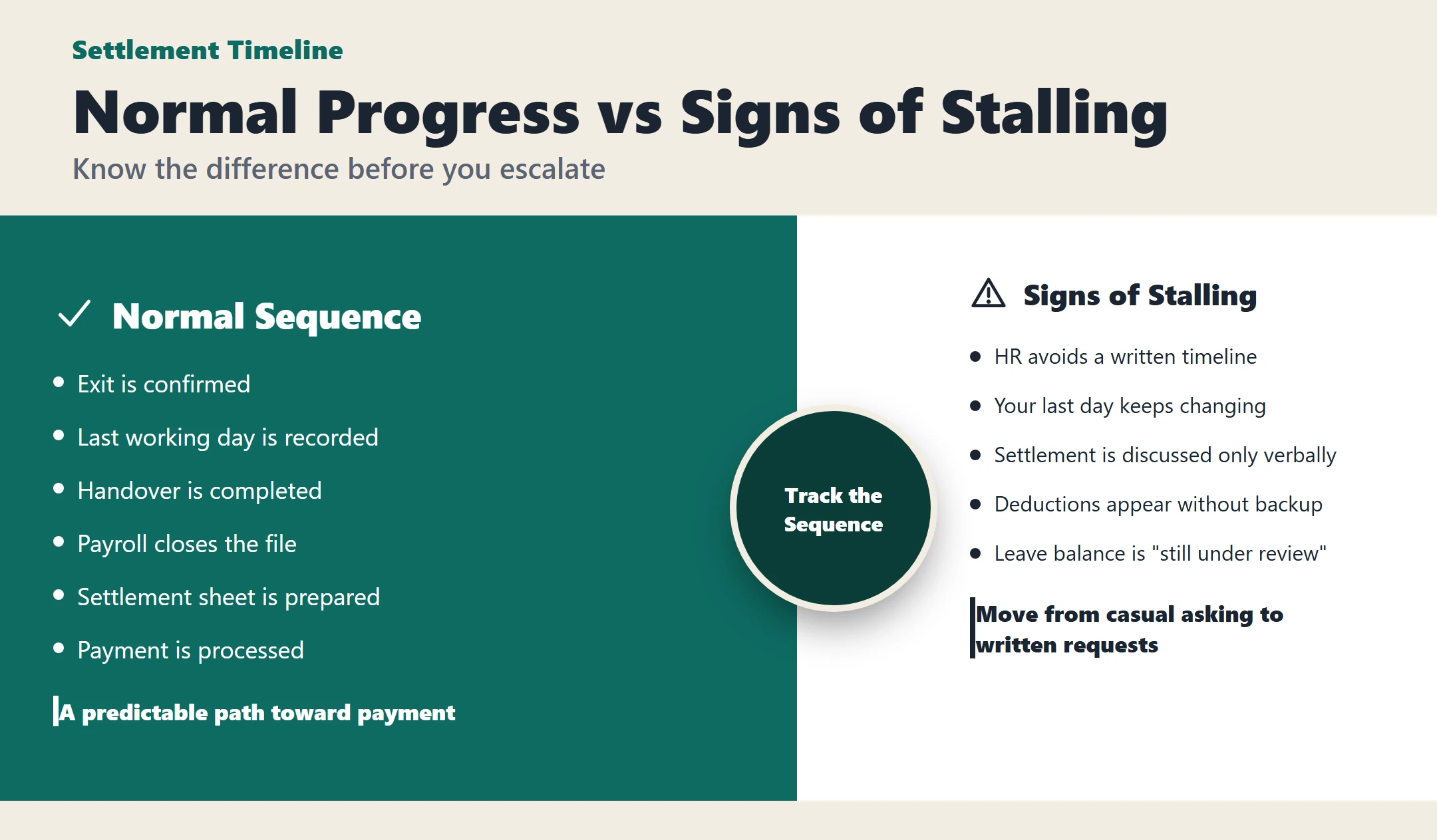
Most settlements move through a sequence:
- Exit is confirmed
- Last working day is recorded
- Handover is completed
- Payroll closes the file
- Settlement sheet is prepared
- Payment is processed
Signs of stalling
- HR avoids giving a written timeline
- Your last day keeps changing in emails
- Settlement is discussed verbally only
- Deductions appear without backup
- Leave balance is “still under review” for too long
- Payroll says HR has not released the file
When that happens, move from casual asking to written requests. Keep each message short, clear, and dated.
Unfair dismissal signals and how to document calmly
Without becoming legalistic, some patterns often lead to disputes:
- Sudden termination without clear written reason
- Pressure to resign instead of receiving a formal decision
- Settlement numbers shared without breakdown
- Backdated documents
- Passport or personal document pressure
- Threats tied to accepting a lower figure
Document without inflaming conflict:
- Save screenshots
- Keep PDFs of letters and payslips
- Write short factual summaries after meetings
- Confirm key points by message
- Store all files in one folder by date
How to build one evidence folder
Use one folder with simple names:
- 01 Contract
- 02 Renewals
- 03 Payslips
- 04 Bank Transfers
- 05 Salary Revisions
- 06 Leave Records
- 07 Notice or Resignation
- 08 Termination Letter
- 09 Handover
- 10 Settlement Draft
- 11 HR Messages
- 12 Manager Messages
- 13 ID and Iqama Copies
- 14 Attendance Records
- 15 Deductions Evidence
Use a file naming format like:
YYYY-MM-DDDocumentTypeCompanyName
This makes disputes easier to explain and faster to review.
Low-friction HR escalation sequence
Here is a simple 4-step sequence:
- HR request: “Please share the EOSB basis, leave balance, and itemized settlement.”
- Manager follow-up: “I’m trying to close my final settlement accurately. HR has not yet confirmed the basis.”
- Formal letter: “Please confirm the final settlement breakdown and supporting records by line item.”
- External preparation: gather your folder, timeline, and requested clarifications
External dispute channels: overview only
If internal escalation does not work, official dispute routes may become relevant. Before taking that step, prepare:
- Full document folder
- Timeline of events
- Settlement draft
- All written requests
- Salary and leave evidence
- Termination or resignation documents
Preparation matters more than emotion. A complete file is stronger than a long complaint.
Deadlines and “don’t wait too long” triggers
Act early if you see any of these:
- Salary delays start before exit
- HR refuses written confirmation
- Termination threats become frequent
- Payslips stop matching bank transfers
- Leave balances disappear from the system
- You are asked to sign a blank or unclear document
- Exit category changes verbally
- Important records are suddenly unavailable
Waiting too long usually makes reconstruction harder.
Practical scenario: HR offers a number that looks wrong
If HR sends one settlement number without detail, audit the inputs first.
Check:
- Start and end dates
- Exit type
- Salary base
- Leave balance
- Unpaid salary
- Deductions
- Notice handling
Then reply with a correction request:
“Thank you. Before I confirm, please share the calculation basis for EOSB, the salary base used, leave balance, and any deductions with supporting records. I would like to verify the inputs line by line.”
When to seek professional help
Consider getting professional help if:
- The amount is large enough to affect your move
- You received a termination letter you do not understand
- You are being pressured to resign
- Key records are missing
- Deductions are significant and unexplained
- HR and management are giving conflicting answers
- Personal documents are being withheld
Use risk, not emotion, as your decision rule.
FAQ: EOSB and final settlement
Is EOSB the same as final settlement?
No. EOSB is one part of the final settlement.
What do I need for a quick estimate?
Start date, end date, exit type, salary base, salary history, and unpaid leave details.
Should I use my total salary package?
Not automatically. Ask HR what wage basis they are using in writing.
Does resignation change the outcome?
It can. Confirm the official exit category first.
What if my salary changed during employment?
Split the periods cleanly and compare that method to HR’s worksheet.
How do I check unused leave payout?
Ask for leave days, daily rate, and total payout amount.
What if HR gives only one final number?
Request an itemized breakdown with supporting records.
What documents are most important?
Contract, renewals, payslips, bank transfers, leave records, notice or termination letters, and settlement drafts.
Should I sign if I do not understand the numbers?
It is safer to ask for clarification first.
What should I do before escalating externally?
Build one evidence folder and summarize the timeline in writing.
Mini-templates: short requests to HR
Request breakdown
“Please share the itemized final settlement, including EOSB basis, unpaid salary, leave payout, overtime if any, and deductions.”
Confirm notice
“Please confirm my official notice period, whether it will be worked or waived, and the final last working day.”
Request leave balance
“Please confirm my current unused leave balance in days and the rate that will be used for payout.”
Confirm probation clause
“Please share the contract clause that applies to probation and confirm whether HR is treating my exit under that clause.”
Next step after settlement
Get a professionally rewritten CV/Resume, clear positioning, and an application-ready package for expats planning their next role—start here .