

Changing employers in Saudi Arabia is not just about getting a new offer. The real risk usually comes from poor timing, inconsistent records, missing proof, or starting the process before your details are clean.
This guide explains the transfer process in a practical order. The aim is to reduce rejection risk, avoid preventable delays, and protect salary continuity while you move from one employer to another.
Check Your Identity and Record Consistency First
Before any transfer starts, make sure your personal records match across all core documents. A small mismatch can trigger a platform rejection or create a manual correction delay.
Check these items carefully:
- Full name spelling in English
- Iqama number
- Passport number
- Passport expiry date
- Date of birth
- Nationality
- Hire date if it appears in any work record
- Job title if shown in contract-related documents
A common problem is spelling differences between a passport and employer records. Even one missing middle name or a reversed surname can create trouble. If you spot a mismatch, fix it before proceeding instead of assuming the system will accept it.
Example: name spelling mismatch fix routine
If the platform rejects your request because your name appears differently in two places, use this routine:
- Compare your passport, iqama, current contract, and offer letter side by side.
- Highlight the exact mismatch.
- Ask HR to correct the record using the exact passport spelling.
- Save screenshots before correction and after correction.
- Retry only after all records match.
Date mismatches also matter. If the hire date in one record does not match a contract-related date, clarify it before the transfer begins. For a broader view of mobility rules and transfer logic, review changing jobs legally under the mobility system .
Check Iqama Validity and Plan the Timing
Iqama timing matters because a transfer started too late can create stress, rushed decisions, or payroll uncertainty. It is better to think in terms of safe windows rather than last-minute action.
Safe windows checklist
Use this planning checklist before agreeing on dates:
- Your iqama is valid for a reasonable period beyond the intended transfer stage
- You are not trying to solve expiry pressure and transfer issues at the same time
- The new employer understands your timing constraints
- Your planned start date includes a buffer for delays
- You have avoided unnecessary travel during a sensitive stage
The key lesson is simple: do not build your move around the most optimistic timeline. Build it around a realistic one with room for delay.
Check Contract and Employment Status Before Starting
Your status matters as much as your documents. A transfer can get stuck when your employment status is unclear, inactive, pending, or inconsistent across systems.
Statuses that often create blockers include:
- Incomplete onboarding status
- Unclear active or inactive employment status
- Pending employer action
- Contract terms not yet fully reflected
- Unresolved internal HR changes
Status screenshot checklist
Before starting, capture screenshots of:
- Current employment status
- Contract status
- Any pending requests
- Employer profile details relevant to the transfer
- Date and time visible on screen if possible
This creates proof in case the issue later turns into a “we never saw that status” discussion. If you are assessing employer-side stability before moving, it helps to understand Nitaqat and company stability risks .
Check Salary Reliability Risk Before You Move
Even if a transfer is technically possible, payroll issues can complicate the move. If your current salary history is irregular, you may need cleaner records before taking action.
Collect proof that helps establish your employment and payment pattern:
- Recent payslips
- Bank salary entries if available to you
- Salary confirmation emails or letters
- Contract showing agreed salary
- Any approved adjustment letter
- Screenshots of payroll status where relevant
These records matter because payment disputes are harder to sort out once the transfer is already moving. If your case also involves deductions, notice concerns, or other worker protections, a practical understanding of expat labor rules can help you ask better questions and save the right proof .
Build One Complete Documents Pack
Prepare one complete pack before anyone starts the transfer steps. This saves time and lowers the chance of repeated requests.
Your document pack should include:
- Offer letter
- Signed contract or latest draft
- Passport copy
- Iqama copy
- Recent payslips
- Salary proof if needed
- HR letters related to role, salary, or dates
- Dependents-related documents if family timing may be affected
- A simple transfer timeline note with planned dates
Use a clear file naming convention
A simple naming structure makes documents easy to find:
Passport_FullName_YYYY-MM-DDIqama_FullName_YYYY-MM-DDOfferLetter_CompanyName_YYYY-MM-DDContract_CompanyName_YYYY-MM-DDPayslip_Month_YearSalaryProof_Bank_Month_YearTransferStatus_StepName_YYYY-MM-DD_HHMM
Clear naming helps when HR asks for a file again or when you need proof quickly.
Plan the Timeline: Best Case vs Worst Case
Do not plan your move using only one date. Plan with a range.
Basic timeline template
Your working timeline should include:
- Offer date
- Contract review date
- Transfer initiation date
- Employee acceptance date
- Employer response window
- Expected completion date
- Planned onboarding date
- Fallback date if delayed
Best-case and worst-case thinking
A best-case scenario means all parties act quickly and the records are already clean.
A worst-case scenario may include:
- A mismatch correction
- A delayed response
- A platform issue
- A document re-upload request
If you do not plan for delay, you may resign or hand over too early. Before taking that step, review a practical checklist for before resigning in Saudi Arabia .
Choose the Right Start Date to Avoid Gaps
The right start date is not simply the date the new employer prefers. It should align with transfer completion, actual onboarding readiness, and salary continuity.
Start date logic
A safer start date usually considers:
- When the transfer is likely to complete
- Whether onboarding is ready
- Whether payroll setup is ready
- Whether equipment, access, and reporting lines are ready
- Whether your previous work relationship has a clean ending point
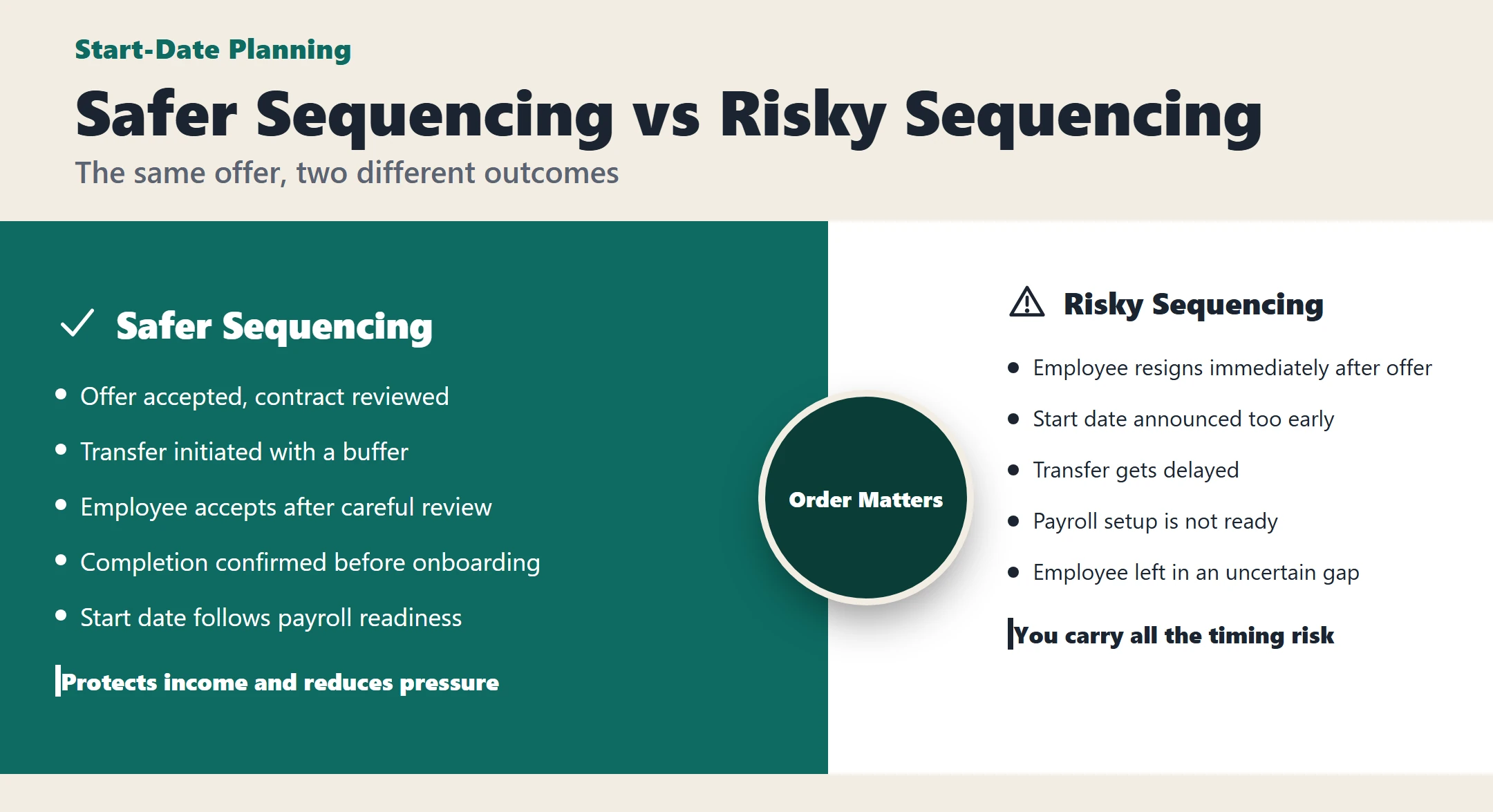
Example 1: safer sequencing
- Offer accepted on Day 1
- Contract reviewed on Day 3
- Transfer initiated on Day 5
- Employee accepts on Day 6
- Completion confirmed after required actions
- Formal onboarding begins after confirmation
- First working day starts when payroll setup is already prepared
This reduces the risk of hearing, “You joined, but payroll is not active yet.”
Example 2: risky sequencing
- Offer accepted
- Employee resigns immediately
- Start date announced too early
- Transfer gets delayed
- Payroll setup is not ready
- Employee is left in an uncertain gap
A smart sequence protects your income, not only your job title.
If you want stronger applications for your next move, we can help you rewrite or optimize your CV/Resume so it is clearer, better positioned, and ready for Saudi job applications.
Use a Final Decision Gate Before Starting the Transfer
Use this as your final readiness check before proceeding.
Final gate checklist
- All identity details match exactly
- Iqama timing is safe enough for a non-rushed process
- Offer and contract are consistent
- Employment status is clean
- Salary proof is collected
- Documents are saved in one folder
- Start date is realistic
- You understand the likely response windows
- You have screenshots of your current status
If two or more items are still unclear, pause and fix them first.
Understand the Transfer Workflow Overview
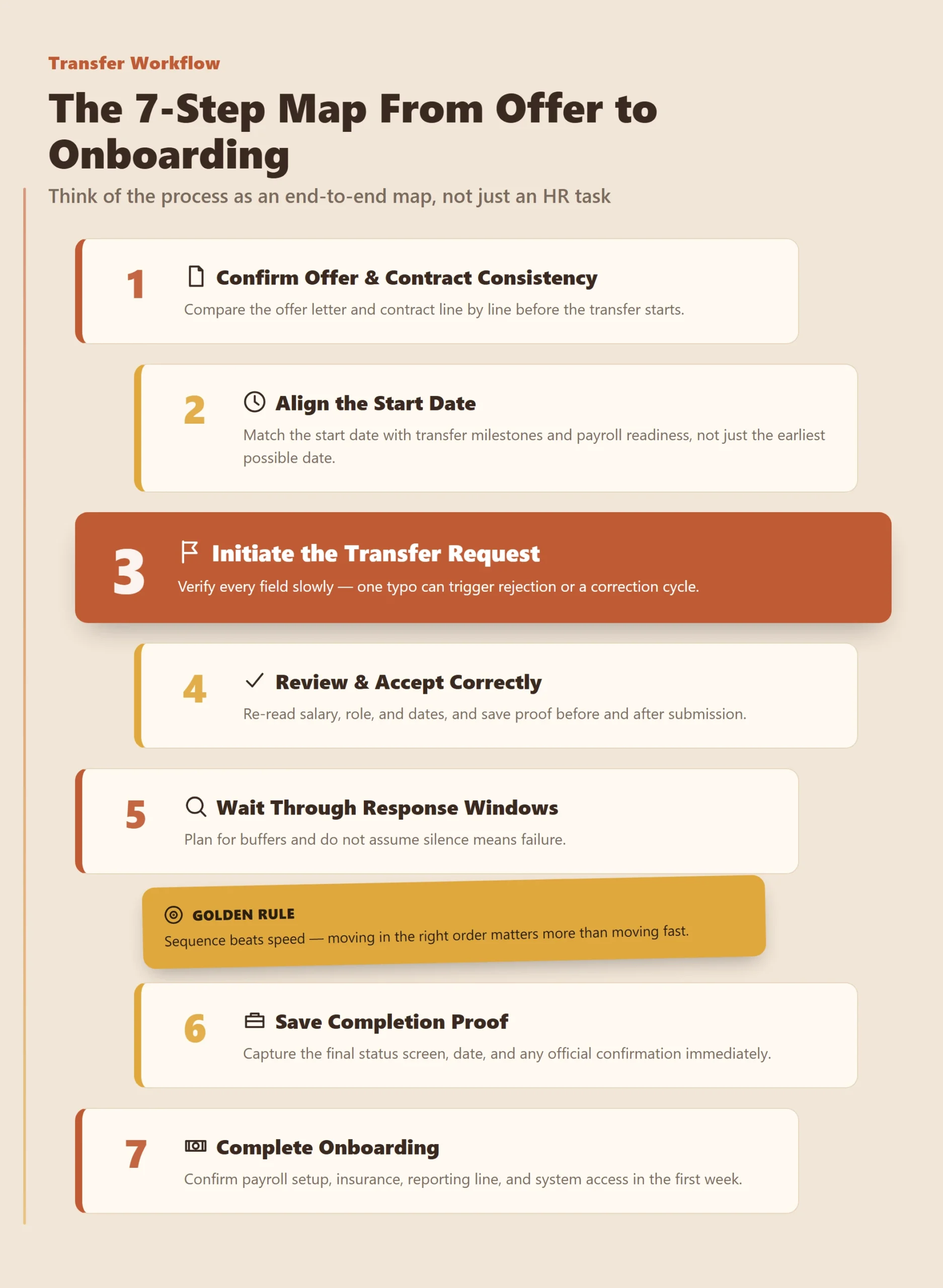
Think of the process as an end-to-end map, not just an HR task.
The 7-step map
- Confirm offer and contract consistency
- Align the start date with transfer milestones
- Initiate the transfer request
- Review and accept correctly
- Wait through employer response windows with buffers
- Save completion proof
- Complete onboarding and verify payroll setup
Step 0: Build Your Transfer Folder
Create one main folder with subfolders so every proof item has a place.
Suggested structure:
01_Identity02_Offer_Contract03_Salary_Proof04_Status_Screenshots05_Transfer_Request06_Acceptance07_Completion08_Onboarding
What screenshots to capture at each stage
Take screenshots of:
- Initial employment status
- Submitted request confirmation
- Acceptance screen before and after action
- Status changes
- Completion confirmation
- Payroll or onboarding confirmation
This makes later disputes much easier to handle.
Step 1: Confirm Offer and Contract Consistency
Compare the offer letter and contract line by line before the transfer starts.
Red flags include:
- Different salary amounts
- Different role titles
- Different location
- Different start dates
- Different allowances or benefits wording
- Missing probation or notice wording that was discussed
How to request correction
Keep the request simple and specific:
- Point to the exact clause
- Attach both documents
- Ask for one corrected version
- Request written confirmation before the transfer proceeds
Do not rely on verbal promises that the issue will be fixed later.
Step 2: Align the Start Date With Transfer Milestones
Use a schedule with buffers instead of one fixed optimistic promise.
Simple scheduling template
- Planned initiation date
- Expected employee acceptance date
- Response buffer
- Completion buffer
- Onboarding preparation date
- Actual start date
Two realistic examples
Example A: Conservative planning
- Initiation this week
- Acceptance next day
- Buffer added for delays
- Start date placed after completion and payroll setup
Example B: Tight planning
- Initiation near a deadline
- Acceptance delayed
- Employer response takes longer
- Start date must be revised
The conservative plan is usually safer than the “we hope it works” plan.
Step 3: Initiate the Transfer Request Carefully
Before submission, verify every field slowly.
Double-check checklist
- Full name
- Iqama number
- Passport details if required
- Salary figure
- Job title
- Work location
- Contract dates
- Start date logic
- Attached documents if requested
One typo can trigger rejection or force a correction cycle. Slow checking is faster than restarting the process.
Step 4: Review Employee Acceptance Carefully
This step looks easy, but many avoidable errors happen here.
Common acceptance mistakes
- Accepting without reviewing details
- Missing a deadline
- Overlooking a wrong salary figure
- Ignoring an incorrect job title
- Failing to save proof of acceptance
Before you click accept
- Re-read salary and role
- Check dates again
- Confirm company name
- Save a screenshot before final submission if possible
- Save proof immediately after acceptance
A few extra minutes here can prevent a much bigger delay later.
Step 5: Plan for Employer Response Windows
A response window is the period in which the next action is expected from the relevant party. The main mistake is assuming silence means failure.
How to plan buffers
- Do not resign in panic just because a response is slow
- Keep screenshots of status each time it changes
- Set personal check points instead of refreshing constantly
- Follow up politely with timestamps and evidence
- Keep your work and handover professional during the waiting period
Short no-response escalation script
If the case is stuck with no visible movement, a simple message is enough:
- “Hello, I’m following up on my transfer status. The current status has not changed since [date/time]. I have attached the screenshot. Please confirm whether any action is pending from my side.”
Step 6: Save Completion Confirmation Proof
When the transfer completes, save proof immediately. Do not assume you can retrieve it easily later.
Completion proof checklist
- Final status screen
- Date and time of completion
- Updated employment record if visible
- Official confirmation message if available
- Copy of final contract or onboarding document
- Written HR confirmation
This protects you if there is later confusion about status, start date, or payroll responsibility.
Step 7: Handle Onboarding in the First Week
Completion is not the end. The first week is where practical problems often appear.
First-week checklist
- Get your contract copy
- Confirm payroll setup
- Confirm insurance activation if applicable
- Confirm manager and reporting line
- Confirm job title and location
- Confirm system access
- Save proof of all confirmations
This is how you reduce day-one surprises.
Clarify Transfer Fees and Who Pays
Fee responsibility should be clarified early, in writing, and before the process becomes urgent.
Practical handling tips
- Ask the question before initiation, not after
- Request a written answer
- Save the message with date and time
- Avoid vague wording such as “we will handle it later”
Short message template
You can say:
- “Before we proceed, please confirm in writing who will be responsible for any transfer-related fees so I can plan correctly.”
Plan for Dependents and Family Status During Transfer
If you have dependents, your planning needs to be more careful because delays can affect more than one person.
Dependents checklist
- Review each dependent’s current document status
- Check whether timing overlaps with your transfer period
- Keep family documents easy to access
- Avoid unnecessary travel during critical stages
- Ask early if any family-related step could be affected by delay
Family-related issues become harder to manage when they are discovered too late.
Know the Common Rejection Reasons and Fix Paths
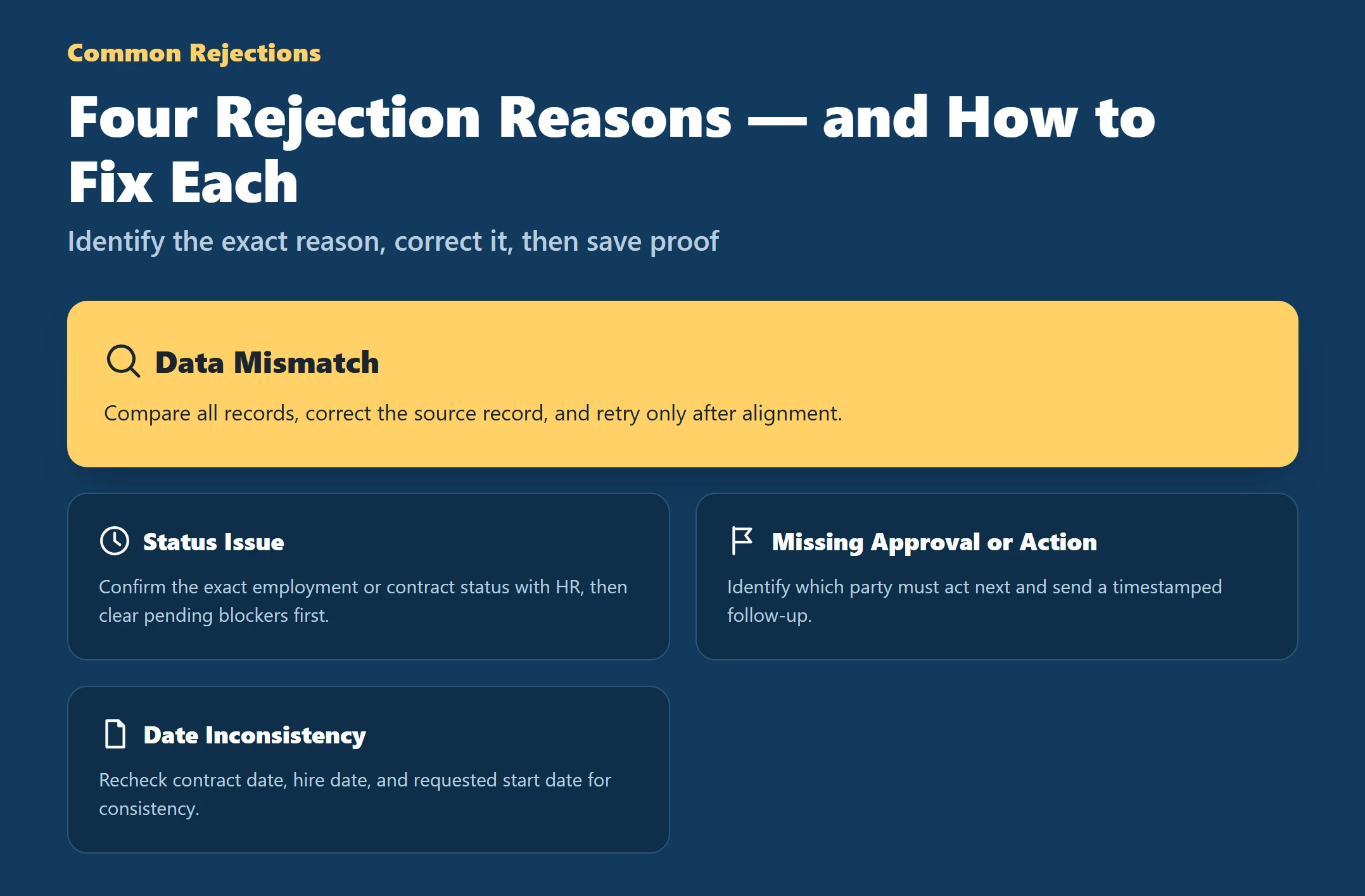
Most rejections fall into a few repeat patterns. The best response is to identify the exact reason, correct it cleanly, and save proof.
1. Data mismatch
Fix path: Compare all records, correct the source record, and retry only after alignment.
Proof to save: Before and after screenshots.
2. Status issue
Fix path: Confirm the exact employment or contract status with HR, then clear pending blockers first.
Proof to save: Current status screen and HR response.
3. Missing approval or missing action
Fix path: Identify which party must act next and send a timestamped follow-up.
Proof to save: Follow-up message and pending screen.
4. Date inconsistency
Fix path: Recheck contract date, hire date, and requested start date for consistency.
Proof to save: Marked comparison copy and corrected version.
Use a General Platform Error Troubleshooting Routine
If the system behaves strangely, use a calm routine instead of clicking repeatedly.
Troubleshooting sequence
- Take a screenshot immediately
- Capture the date and time
- Retry later rather than repeatedly clicking
- Check whether the same error appears consistently
- Save every status change
- Escalate with a short, evidence-based message
- Keep one record of all contact attempts
Repeated random clicking usually creates more confusion, not a solution.
Practice Proof Discipline With Screenshots by Stage
A strong screenshot habit prevents later “they said, you said” problems.
Stage-by-stage screenshot checklist
Before initiation
- Employment status
- Identity details page if relevant
At initiation
- Submitted request screen
- Key details shown on submission
At acceptance
- Offer details shown to the employee
- Acceptance confirmation
During the waiting stage
- Status screens at meaningful intervals
- Any error messages
At completion
- Final confirmation screen
- Updated status
At onboarding
- Payroll setup confirmation
- Contract receipt
- Access or reporting confirmation
Use This One-Page Transfer Checklist
Use this compact version as your printable guide.
Pre-checks
- Match all identity records
- Check iqama timing
- Confirm clean status
- Collect salary proof
- Build the document pack
Initiation
- Compare offer and contract
- Set a realistic start date
- Verify all fields before submission
Acceptance
- Review details carefully
- Accept on time
- Save proof
Proof
- Capture screenshots at each stage
- Save all messages and confirmations
Onboarding
- Confirm payroll
- Confirm contract copy
- Confirm insurance and access
- Save first-week proof
Get a professionally written CV/Resume, cover letter, and optimized application package for expats in Saudi who want a stronger next move—order here .